Modern smartphones and laptops feature smoother screens than ever before. Many users enjoy the fluid motion when scrolling through social media or playing video games. However, screen performance comes at a cost to overall device endurance. It is critical to understand how high-refresh-rate displays affect daily battery consumption so you can make informed choices about your device settings.
This detailed guide explains the science of screen refresh speeds, the hardware components involved, and the real-world impact on battery life. You will learn how different display technologies handle power and how to optimize your device settings without losing visual quality.
1. Understanding Refresh Rates and Screen Smoothness
A screen refresh rate refers to how many times per second the display redraws the image on the screen. This rate is measured in Hertz ($\text{Hz}$). A standard screen updating at $60\text{ Hz}$ redraws the image $60$ times every single second. Higher rates like $90\text{ Hz}$ or $120\text{ Hz}$ update the screen much more frequently.
When a display updates faster, animations appear smoother to the human eye. Motion blur decreases when you scroll through text or move between app screens. Mobile gamers often prefer high speeds because action feels much more responsive to touch inputs.
However, displaying more frames every second requires continuous electronic activity inside your device. The display panel, graphics processor, and system memory must work extra cycles to generate those additional images. Every single frame delivered to your eyes requires a small amount of electrical power from the battery.
How Refresh Rates Are Measured
Refresh rates are stated as a fixed frequency of image updates per second. A $60\text{ Hz}$ panel updates every $16.66\text{ milliseconds}$. A $120\text{ Hz}$ display updates every $8.33\text{ milliseconds}$.
Why Smoothness Requires Extra Energy
Your device hardware must produce twice as many distinct images per second when switching from $60\text{ Hz}$ to $120\text{ Hz}$. This extra work causes increased energy draw across several internal components simultaneously.
2. The Hardware Mechanics Behind Display Power Consumption
To understand display power draw, you must look at how modern display panels operate. A mobile screen consists of millions of microscopic pixels illuminated by a backlight or self-emitting diodes. The display driver integrated circuit sends electrical signals to these pixels to change their color and brightness levels.
When a display operates at a high update frequency, the display controller chip sends signals at a much faster pace. Sending signals at higher frequencies requires higher electrical voltage and current. The integrated circuit generates extra heat, which translates to wasted electrical power.
In addition to the display controller, the central processing unit and graphics processing unit must stay active. The processor must calculate element positions and render frames continuously to match the speed of the screen. When the screen demands $120$ frames every second, the processor cannot enter low-power sleep states between frame renders.
The Role of the Display Controller
The display driver integrated circuit acts as the bridge between your processor and the physical screen panel. Running this controller at high speeds consumes a measurable baseline wattage even when the displayed image remains static.
Processor Load and Thermal Effects
Higher frame targets force the graphics chip to maintain higher clock speeds. Higher clock speeds consume more battery current and increase internal heat generation. Heat reduces overall battery efficiency, leading to faster charge depletion over extended periods.
3. Comparing 60Hz, 90Hz, 120Hz, and 144Hz Power Draw
Not all refresh rates consume the exact same amount of energy. The difference in battery drain increases as the frame target goes higher. Standard $60\text{ Hz}$ displays serve as the baseline for battery testing across the electronics industry.
Upgrading from $60\text{ Hz}$ to $90\text{ Hz}$ requires a $50\%$ increase in frame production per second. This increase typically results in a moderate battery consumption penalty of about $5\%$ to $10\%$ over a full day of mixed use. Many users find this tradeoff reasonable for the added smoothness.
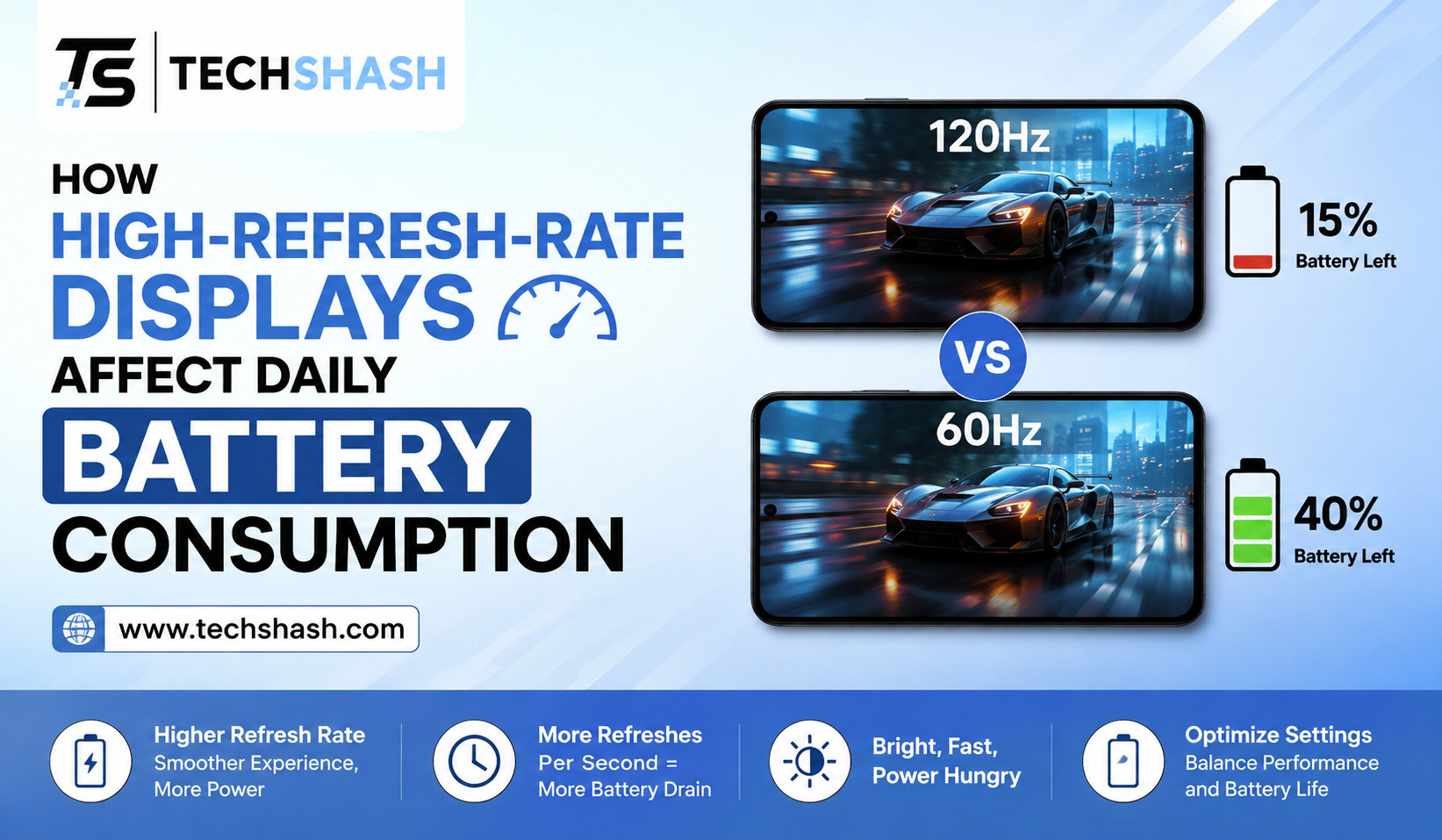
Upgrading from $60\text{ Hz}$ to $120\text{ Hz}$ doubles the frame count per second. Tests show that forced $120\text{ Hz}$ modes can reduce total battery life by $15\%$ to $25\%$ depending on the display technology used. Pushing screens to $144\text{ Hz}$ or higher causes even steeper power drain, which is why those rates are usually reserved for dedicated gaming phones.
| Display Refresh Rate | Frame Updates Per Second | Average Daily Battery Impact | Primary Use Case |
| $60\text{ Hz}$ | $60$ updates | Baseline reference | Standard media and reading |
| $90\text{ Hz}$ | $90$ updates | $5\%$ to $10\%$ extra drain | Balanced daily operation |
| $120\text{ Hz}$ | $120$ updates | $15\%$ to $25\%$ extra drain | Premium smartphones and gaming |
| $144\text{ Hz}$ | $144$ updates | $25\%$ to $35\%$ extra drain | Dedicated mobile gaming devices |
Baseline Versus High-Rate Consumption
A device running at a static $60\text{ Hz}$ rate allows internal processors to enter idle power states frequently. Running a fixed $120\text{ Hz}$ panel prevents those processors from resting, creating a constant power drain floor during operation.
Comparing High Rates
The difference in visual smoothness between $90\text{ Hz}$ and $120\text{ Hz}$ feels smaller than the jump from $60\text{ Hz}$ to $90\text{ Hz}$. However, the jump from $90\text{ Hz}$ to $120\text{ Hz}$ causes a higher energy penalty relative to the visual gain.
4. The Technology of Adaptive Refresh Rates and LTPO Panels
Hardware manufacturers recognized that running high refresh rates constantly drains batteries too fast. To solve this problem, engineers developed adaptive refresh rate technology. Adaptive displays change their update speed automatically based on the content shown on the screen.
Low-Temperature Polycrystalline Oxide, commonly known as LTPO, is a specialized display backplane technology. LTPO panels can switch their refresh rate dynamically without causing screen flicker or color shifts. An LTPO screen can run at $120\text{ Hz}$ while you scroll, and drop to $1\text{ Hz}$ when you look at a still photo.
By dropping to $1\text{ Hz}$ for static images, an LTPO display saves massive amounts of energy. The display driver does not need to send updates to the screen when nothing is moving. This intelligent scaling allows smartphones to feature high-speed displays while maintaining reasonable battery life throughout the day.
How LTPO Backplanes Save Power
Traditional screen backplanes cannot change refresh rates instantly without stability issues. LTPO backplanes use specialized transistor materials that allow instantaneous frequency scaling down to very low limits.
Dynamic Mode Versus Fixed Mode
Fixed high refresh rates force the display to run at full speed constantly, even when reading static text. Dynamic software modes analyze screen motion and drop the frequency immediately whenever movement stops.
5. How High-Refresh-Rate Displays Affect Daily Battery Consumption in Real Usage
The actual impact of high refresh rates depends heavily on your personal daily habits. Different smartphone apps interact with display settings in completely different ways. Understanding your usage patterns helps explain your daily battery drain.
If you spend several hours a day reading electronic books or browsing static web pages, high refresh rates provide little benefit. The screen remains static for long periods, but a non-LTPO panel running at forced $120\text{ Hz}$ still draws extra power. This scenario results in unnecessary battery drain.
Conversely, if you spend your day scrolling through video feeds, playing high-frame-rate games, or navigating system menus, the screen updates constantly. In this situation, high-refresh-rate displays affect daily battery consumption by increasing total power draw over your entire active screen time. Users may lose between one and two hours of total screen-on time per charge.
Browsing and Social Media Impact
Social media applications involve continuous vertical scrolling and animations. Running these applications at $120\text{ Hz}$ increases GPU work significantly, leading to noticeably faster battery depletion.
Video Playback and Static Reading
Most digital movies and online videos are recorded at $24\text{ frames per second}$, $30\text{ frames per second}$, or $60\text{ frames per second}$. Displaying a $24\text{ fps}$ video on a fixed $120\text{ Hz}$ screen wastes energy because the display repeats identical frames multiple times.
6. Impact of Graphics Processing and CPU Workload
The display panel is not the only component consuming electricity when high update speeds are active. The graphics chip and system processor experience higher workloads whenever screen motion occurs. These silicon chips draw substantial current from the battery during peak activity.
When an application renders content at $120$ frames per second, the graphics engine must calculate lighting, textures, and geometry twice as fast as it does for $60$ frames per second. If the processor cannot keep up with this demand, frame drops occur. Frame drops cause visual stuttering while still drawing high power from the battery.
Furthermore, high computational loads produce thermal energy inside the compact body of a mobile device. When internal temperatures rise, lithium-ion batteries become less efficient at delivering current. Thermal resistance increases internal power loss, accelerating the rate of charge depletion during long usage sessions.
Increased GPU Computational Loads
Rendering double the frames requires the graphics engine to process twice as many draw calls. This continuous workload keeps GPU cores operating at higher voltage states, creating a steady graphics energy penalty.
Thermal Effects on Lithium-Ion Batteries
Heat generated by hard-working processors reduces chemical battery efficiency. Hotter device operation accelerates power loss and contributes to faster overall battery capacity degradation over long periods.
7. Practical Steps to Reduce Display Battery Drain
You do not have to disable high update speeds permanently to achieve good battery life. Modern operating systems provide settings that allow you to balance visual performance with battery endurance. Taking advantage of these options gives you full control over your device power consumption.
First, enable dynamic or adaptive refresh rate mode in your device display settings. This setting allows the system to boost speeds during scrolling while dropping speeds during static viewing. Avoid using developer options to force peak refresh rates continuously across all applications.
Second, consider using built-in power saver modes when your battery level runs low. Most smartphones automatically reduce screen speeds to $60\text{ Hz}$ when power saving mode is active. You can also manually adjust screen brightness, as high brightness combined with high update speeds creates severe battery drain.
Recommended Settings Checklist
- Enable Auto-Adjust Refresh Rate or Dynamic Mode in Display Settings.
- Avoid forcing peak speeds inside system developer options.
- Turn on Power Saving Mode when battery level drops below $20\%$.
- Reduce screen brightness or enable Auto-Brightness mode.
- Lower total screen resolution if your device supports dual resolution modes.
When to Use 60Hz Mode
If you are traveling without access to a charger, switching your display manually to $60\text{ Hz}$ is an effective way to preserve power. Disabling high update speeds can extend operational time by several hours when reading or using turn-by-turn navigation.
Key Takeaways
- Primary Power Factor: High refresh rates require display controllers and processors to work faster, increasing total battery consumption.
- Percentage Loss: Running a screen at a fixed $120\text{ Hz}$ rate can reduce total daily battery life by $15\%$ to $25\%$ compared to standard $60\text{ Hz}$.
- LTPO Solution: LTPO display technology reduces power draw by scaling update speeds down to $1\text{ Hz}$ for static images.
- Usage Impact: Continuous scrolling and mobile gaming cause higher battery drain at high refresh rates than watching static videos or reading text.
- Optimization Strategy: Using adaptive refresh rate settings and automatic brightness controls preserves battery life while maintaining smooth visuals.
FAQs
Do high refresh rates use more battery even when the screen is dark?
Dark pixels on an OLED display draw minimal power, but the display controller still uses extra electrical current to maintain a high update frequency.
How much battery life do I save by switching from 120Hz to 60Hz?
Switching your display from $120\text{ Hz}$ to $60\text{ Hz}$ typically provides an extra $15\%$ to $25\%$ of total daily screen-on time depending on your usage.
Does watching videos on a 120Hz screen drain more battery?
Watching standard videos at $120\text{ Hz}$ drains extra battery unless your device uses adaptive refresh rate technology to match the video frame rate.
Is LTPO display technology worth the extra cost for battery life?
LTPO panels provide significant power savings by automatically dropping update frequencies down to $1\text{ Hz}$ when full motion is not needed.
Does lowering screen brightness offset the battery drain of 120Hz mode?
Lowering screen brightness reduces power consumption substantially and helps compensate for the extra energy used by higher update speeds.
Conclusion
Understanding how high-refresh-rate displays affect daily battery consumption empowers you to customize your device for maximum efficiency. While higher update speeds deliver exceptionally smooth scrolling and improved touch response, they place continuous demands on your screen hardware, central processor, and graphics chip. By taking advantage of dynamic LTPO display modes, managing screen brightness, and lowering refresh rates during critical situations, you can enjoy a responsive screen without worrying about your battery dying before the end of the day.