Deciding to buy a new smartphone often brings up a big question about operating systems. Thinking about switching from iOS to Android can feel like a major move if you have used an iPhone for years.
This detailed guide breaks down every benefit and drawback so you can decide if changing platforms fits your lifestyle. You will learn about hardware options, software quirks, daily convenience, and potential headaches before making a final choice.
1. Unmatched Customization and Personalization Freedom
Android gives users control over how their phone looks and behaves. Apple has added more features over the years, but Google still offers far deeper flexibility.
Home Screen Layouts and Custom Widgets
You can place app icons anywhere on your home screen grids without forced alignment rules. Custom launcher apps let you change icons, font styles, gestures, and screen transition animations completely.
Interactive widgets on Android allow you to complete tasks without launching full applications. Controlling smart home equipment or editing task lists happens directly from your main screen displays.
Choosing custom launcher software gives your smartphone a clean, personalized layout that matches your aesthetic taste.
Default App Selection and System Tweaks
Android allows you to pick default software for web browsing, email processing, messaging, and phone dialing. Opening a website link always launches your favorite third-party browser instantly without resetting back to system defaults.
You can tweak system settings that Apple keeps strictly hidden from regular consumers. Audio equalizer settings, animation speed controls, and notification grouping rules can all be adjusted easily.
2. Hardware Diversity and Charging Flexibility
Moving to Android opens up hundreds of different phone models built by competing technology manufacturers. Apple limits your choices to a few screen sizes within a single design lineup.
Variety of Form Factors and Foldable Screens
You can purchase traditional glass slab phones, compact devices, or folding smartphones that open like small books. Clamshell flip phones fit comfortably into tiny pockets while offering full touch displays when opened.
High refresh rate screens, under-display cameras, and built-in stylus pens are available across multiple price brackets. You do not have to buy the most expensive model to get high-grade display technology.
Investing in foldable display technology offers exciting multitasking capabilities that standard flat devices simply cannot match.
Universal USB-C and Charging Speed Options
Android devices have used standardized USB-C ports for charging and data transfer across many generations. A single laptop cable can charge your phone, wireless earbuds, and portable speaker without carrying extra adapters.
Battery charging speeds on top Android handsets reach impressive numbers. Some models fill their battery from zero to full in less than thirty minutes using included high-wattage power adapters.
3. App Ecosystem and File System Management Differences
How you store photos, music, and work documents differs greatly between these two operating systems. Google treats smart devices more like open laptop computers.
Access to Sideloading and Third-Party App Stores
Installing software applications is not limited strictly to the official Google Play Store. You can download specialized software utilities directly from verified developer web pages or alternative marketplaces.
Sideloading applications gives advanced users access to open-source tools, legacy software, and regional applications. This openness provides total freedom regarding what software runs on your physical hardware.
Utilizing direct app installation allows you to test experimental software utilities that app store filters might block.
Direct File System Access via USB
Plugging an Android device into a personal computer opens up familiar file directory folders. You can drag and drop music files, video clips, or PDF documents just like using a flash drive.
On-device file manager applications let you organize folders, extract zip archives, and rename files easily. Moving large project files between external drives and local storage takes minimal effort.
4. The Real Friction of Switching From iOS to Android
Leaving Apple hardware behind comes with practical challenges that require patience during your initial transition period. Shared services inside the Apple world do not always transfer cleanly to rival systems.
Disconnecting From iMessage and FaceTime
Blue text message bubbles disappear the moment you move your phone number over to Android. Group chats with friends using Apple hardware might drop your media quality or miss modern text reactions.
FaceTime video calls require an Apple user to send you a web browser link beforehand. You cannot place direct FaceTime calls to family members using native phone dialer applications.
Managing message protocol changes requires setting up cross-platform messaging apps like WhatsApp or Signal to keep clear group communications.
Sync Issues With Apple Watch and iPad
An Apple Watch loses most of its health tracking and communication functions when disconnected from an iPhone. You will need to purchase a new smartwatch powered by Wear OS or standard health bands.
Shared clipboards, seamless AirDrop file transfers, and instant hot-spot syncing with Mac computers will stop working automatically. Finding replacement software bridges takes time and effort.
5. Long-Term Software Support and Device Resale Value
Smartphones represent significant monetary investments that people expect to use for several consecutive years. Understanding long-term ownership costs helps you budget wisely over time.
Update Cycles Across Different Smartphone Brands
Google and Samsung now offer up to seven full years of operating system updates for top flagship devices. This extended commitment matches Apple software support timelines for high-end mobile hardware.
Budget and mid-range Android devices from smaller brands might only receive two years of major operating system upgrades. Checking manufacturer update guarantees before buying a phone is essential for security.
Selecting devices with extended software support keeps your mobile phone safe against modern security threats for many years.
Trade-In Value and Depreciation Rates
Used iPhones generally keep a higher percentage of their original retail value after two or three years of use. Selling an old iPhone on second-hand marketplaces usually yields higher cash returns.
Android devices suffer faster price drops on the secondary market within their first twelve months. Buying a slightly used Android handset saves money, but trading one in later brings lower trade-in allowances.
6. Making the Final Decision for Your Daily Mobile Needs
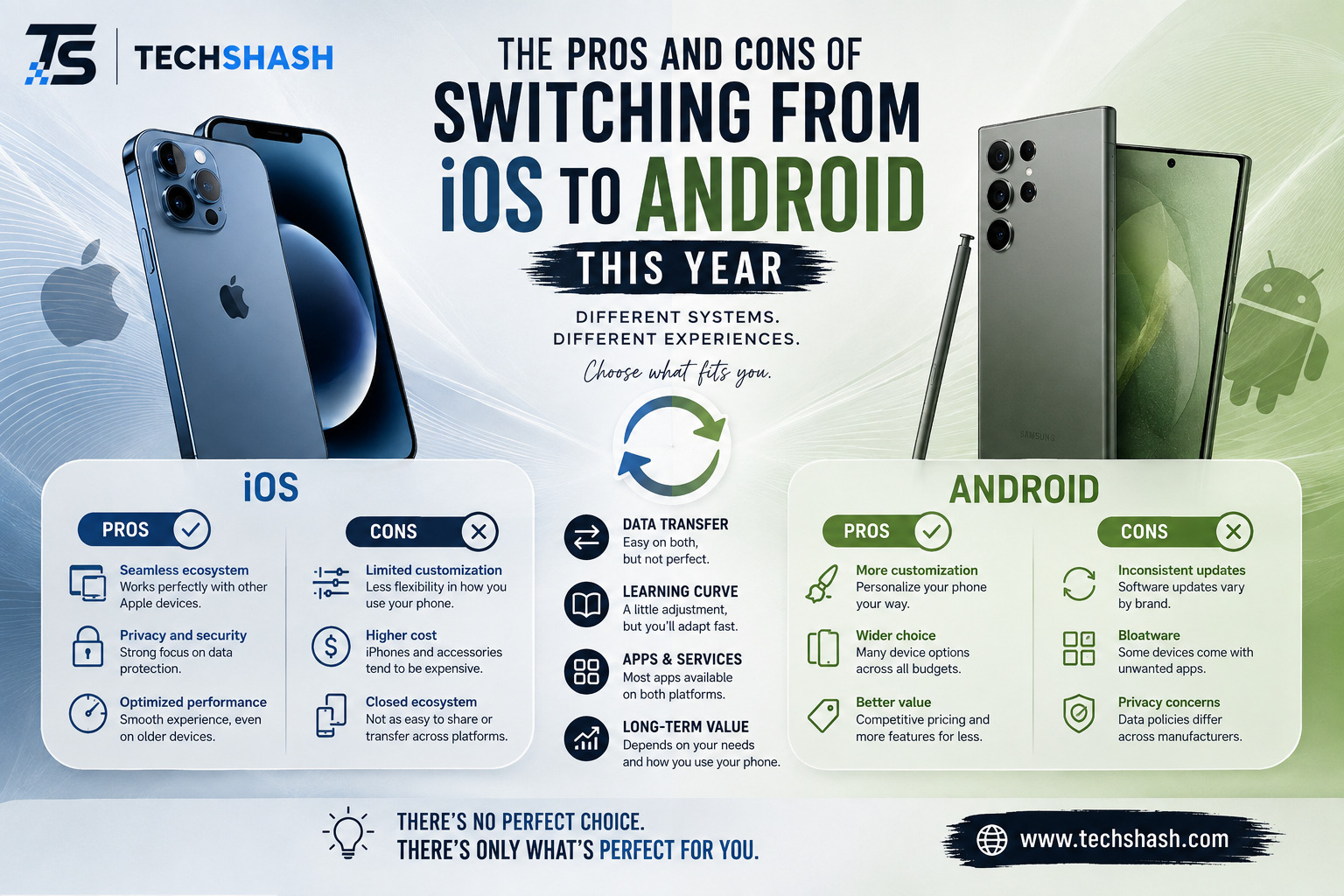
Deciding whether switching from iOS to Android makes sense comes down to personal priorities regarding software freedom and ecosystem habits. Weighing convenience against customization helps clarify your ultimate choice.
Who Should Make the Switch Right Now
You should switch if you feel limited by standard iPhone home screen layouts and restrictive file sharing. Mobile productivity users who manage complex files will appreciate direct folder access.
Anyone interested in folding hardware or ultra-fast battery charging will find great satisfaction in current Android models. The hardware innovation rate across competing brands remains consistently high.
Choosing platform independence gives you freedom to pick hardware from any brand without feeling locked down.
Who Should Stay With Apple Hardware
You should stay on iOS if your immediate family relies heavily on shared iMessage groups and Find My device networks. Losing those integrated communication tools can cause daily friction with friends and relatives.
People who own Mac computers, iPads, and Apple TV boxes benefit greatly from staying put. The shared features across Apple devices continue to offer a frictionless daily workflow.
Key Takeaways
- Customization control: Android lets users change home screen layouts, default applications, fonts, and system launchers without restrictions.
- Hardware choices: Switching platforms gives you access to foldable screens, high charging speeds, and diverse form factors.
- File management: Connecting your phone to a desktop computer grants full drag-and-drop access to local storage folders.
- Ecosystem friction: Leaving iOS means giving up native iMessage functionality, AirDrop convenience, and Apple Watch compatibility.
- Resale values: Android phones lose market value faster than iPhones, though long-term software update windows have improved significantly.
FAQs
Will I lose my contacts and photos when switching from iOS to Android?
No, Google provides cloud migration tools that copy your contacts, calendar events, and photo libraries during initial setup.
Can I still use my AirPods if I switch to an Android phone?
AirPods connect to Android phones via standard Bluetooth, but you will lose custom features like automatic ear detection and spatial audio adjustments.
Are mobile banking applications safe to use on Android operating systems?
Official mobile banking applications on the Google Play Store use encrypted security protocols that match the protection level found on iOS software.
How do I transfer my WhatsApp chat history across different operating systems?
You can transfer your full WhatsApp history during the initial phone setup process by connecting both devices with a physical cable.
Do Android phones receive system security patches as quickly as iPhones?
Major Android flagship phones receive monthly security updates rapidly, but cheaper devices from smaller manufacturers often experience minor delays.
Conclusion
The choice of switching from iOS to Android depends on what matters most for your daily smartphone experience. Android excels at offering hardware variety, customizable user interfaces, and flexible file storage choices. Meanwhile, Apple maintains strong ecosystem integration, long resale values, and effortless messaging tools. Evaluating these trade-offs honestly ensures you pick the right mobile tool for your daily life.