Mobile games now feature graphics that rival traditional gaming consoles. Playing intense multiplayer matches on a smartphone is common practice for millions of gamers worldwide.
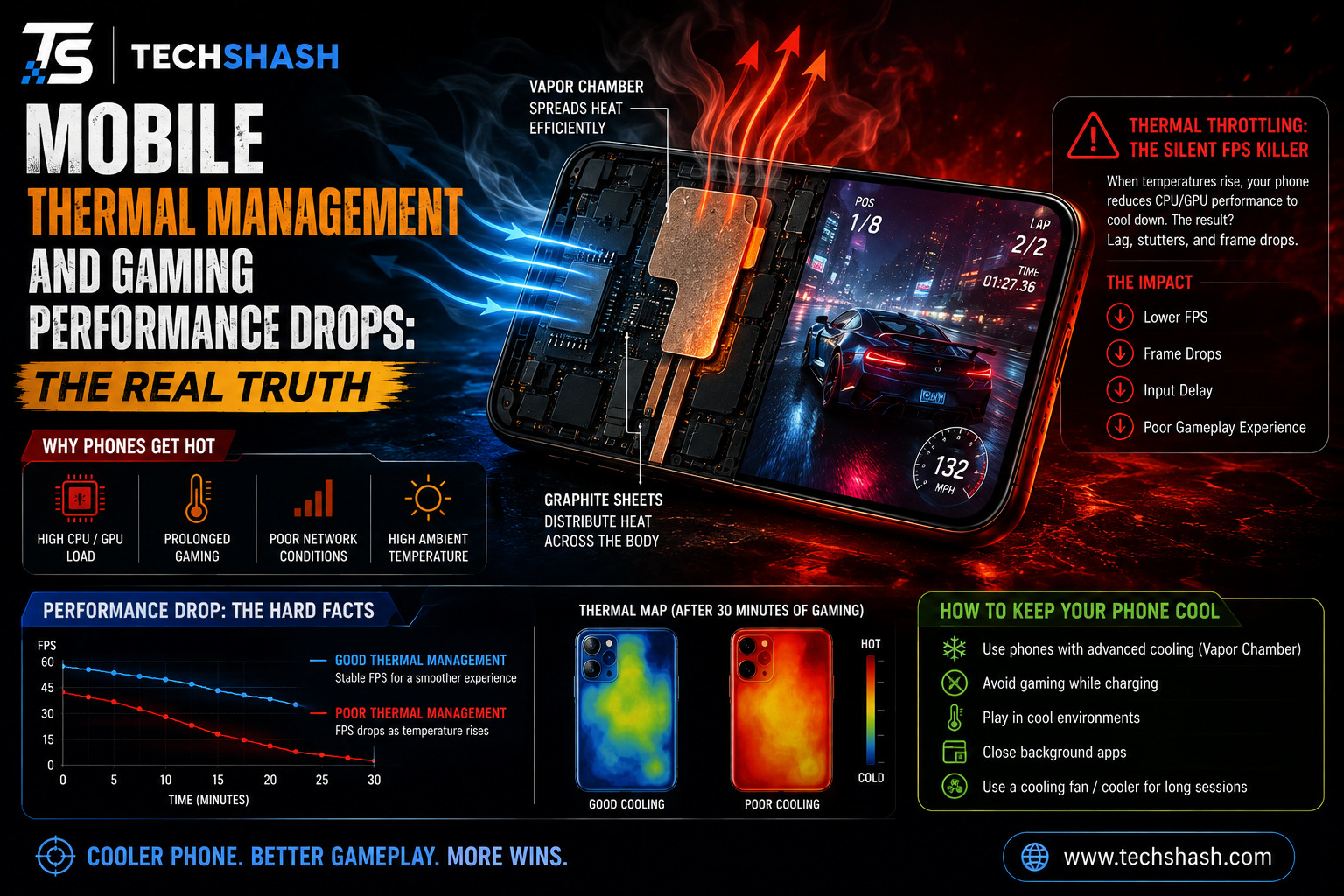
However, many users notice that after twenty minutes of play, their screen grows dim and the game begins to stutter. Effective mobile thermal management is necessary to prevent these sudden performance drops and keep games running smoothly.
Heat buildup inside a handheld phone causes performance issues that frustrate casual and competitive players alike. When internal components get too hot, internal software slows down processor speeds to protect hardware from permanent damage.
This guide explains why phones overheat, how built-in cooling systems function, and how you can stop frame rate drops during long gaming sessions.
1. Why Modern Smartphones Overheat During Gaming Sessions
Smartphones contain powerful processors packed inside thin glass and metal bodies. High-end games demand maximum work from both the central processing unit and the graphics processing unit.
When these chips calculate heavy game physics and render high-definition graphics, electrical energy converts directly into thermal energy. Heat generated in such a confined space cannot escape quickly without active airflow.
Processor Power Demands
Graphics chips work at maximum capacity when drawing complex three-dimensional game worlds. Rendering sixty or one hundred twenty frames every second requires continuous high electrical current.
That high current creates rapid heat accumulation near the top section of the device. High system on a chip heat output remains the leading cause of internal temperature spikes during gaming.
Compact Phone Designs
Unlike personal computers or gaming consoles, smartphones do not contain internal spinning fans. Manufacturers build phones to be thin and water-resistant, which traps hot air inside the chassis.
Glass back covers and metal frames look sleek, but glass acts as a thermal insulator. Trapped internal energy builds up fast when air circulation is non-existent.
- High graphics settings pull maximum current from the battery.
- Sealed phone bodies prevent hot air from escaping into the room.
- Compact chip layouts concentrate thermal energy into small surface areas.
2. Understanding Thermal Throttling and Frame Rate Drops
Thermal throttling is an automatic protective feature built into every modern mobile operating system. Silicon chips suffer permanent damage if operational temperatures exceed safe manufacturing limits for extended periods.
To prevent physical destruction, hardware sensors continuously monitor internal components. When internal temperatures cross unsafe boundaries, the system automatically cuts processor clock speeds.
Temperature Limits and Processor Safety
Silicon chips operate safely below specific temperature limits set by chip makers. Crossing those internal boundaries triggers safety mechanisms inside the operating system.
Lowering the operating frequency drops temperature levels quickly. Reaching a thermal throttling threshold forces the phone to reduce processor speed regardless of current game demands.
Sudden Drops in Frames Per Second
Lower processor speeds mean the graphics chip processes fewer visual frames each second. A game running smoothly at sixty frames per second can suddenly collapse down to twenty frames per second.
This drop creates noticeable visual stuttering, input delay, and screen lag during gameplay. Players often mistake this hardware protection mechanism for a poor wireless internet connection.
- Hardware sensors measure temperature thousands of times every second.
- Clock speeds drop instantly once safety cutoffs are reached.
- Frame rates plummet until internal chips cool back down.
3. Hardware Solutions: Vapor Chambers, Graphite Sheets, and Active Fans
Phone manufacturers design internal hardware elements specifically to carry heat away from critical processors. Moving thermal energy away from the central chip to outer surfaces allows processors to run at high speeds longer.
Engineers use various passive cooling materials inside modern gaming phones to improve passive heat transfer. External accessories also offer active cooling support for severe heat issues.
Passive Heat Dissipation Systems
A vapor chamber consists of a flat, sealed copper envelope containing a tiny amount of liquid. Internal heat boils the liquid into vapor, which travels to cooler parts of the chamber to condense back into liquid.
Graphite sheets work alongside these liquid chambers by spreading heat across a wider surface area. A well-designed vapor chamber cooling system delays the onset of performance drops during heavy gaming.
Active Cooling Fan Accessories
External clip-on fans attach directly to the back casing of a mobile phone. These active cooling attachments blow cool air across the exterior surface to draw out internal thermal energy.
Peltier cooling accessories use thermoelectric modules to freeze heat directly off the back panel. Active cooling keeps the exterior surface cold enough to prevent processor slowdowns.
- Vapor chambers turn internal liquid into gas to transfer heat rapidly.
- Multi-layer graphite sheets spread thermal energy across the back cover.
- Clip-on external coolers provide physical airflow to lower exterior temperatures.
4. Software Solutions and Mobile Thermal Management Systems
Hardware alone cannot handle the intense thermal output of modern mobile games. Software governors work continuously behind the scenes to control power usage and manage chip performance.
Modern operating systems rely on automated software routines to balance energy efficiency against gaming speed. Understanding these mobile thermal management systems helps explain why performance shifts during long play sessions.
Game Boosters and Performance Governors
Built-in gaming software controls how much power the central processor can pull during gameplay. Game booster tools let users select between high performance, balanced output, or battery saving modes.
High performance mode allows processors to reach maximum clock speeds for longer durations. Balanced mode limits maximum clock speeds slightly to delay heat production and maintain steady performance.
Dynamic Voltage and Frequency Scaling
Mobile processors use dynamic voltage and frequency scaling to adjust clock speeds in real time based on active workloads. When a game scene requires less calculation power, the chip drops its working voltage immediately.
Smart software algorithms predict thermal trends based on past user habits and live temperature readings. Adjusting voltage levels dynamically cuts unnecessary heat generation without ruining the visual experience.
- Performance profiles let players prioritize frame rates or temperature levels.
- Dynamic voltage scaling cuts power draw during simple game scenes.
- Software governors prevent unexpected hardware shutdowns caused by extreme heat.
5. The Impact of Ambient Temperature and External Accessories
External environmental conditions play a massive role in how well your smartphone sheds excess heat. A phone operating inside a cool air-conditioned room performs much differently than one used outdoors under direct sunlight.
Accessories attached to the outside of your phone can also block thermal radiation. Small changes to your immediate surroundings make a noticeable impact on sustained frame rates.
Room Temperature and Climate Factors
Smartphones rely on ambient air to absorb heat transferred through the outer body. High ambient environment temperature reduces the speed at which thermal energy moves from the phone into surrounding air.
Playing demanding games in warm environments causes internal temperatures to spike much faster. Air-conditioned rooms allow passive cooling components to work with far greater efficiency.
Phone Cases and Insulating Materials
Thick protective phone cases made from rubber or silicone shield devices from accidental drop damage. Unfortunately, those same protective materials act as excellent thermal insulators that trap internal heat.
Case materials prevent heat from radiating off the back metal or glass surfaces. Removing thick protective covers during intense gaming sessions allows thermal energy to escape into the air faster.
- Hot surroundings slow down natural heat radiation off phone surfaces.
- Thick silicone cases trap thermal energy directly against back panels.
- Direct sunlight increases exterior casing temperatures rapidly.
6. How Battery Health and Charging Speed Influence Heat Generation
Batteries generate significant internal heat during chemical energy discharge and recharge cycles. Playing heavy games while simultaneously fast charging your phone creates dual heat sources inside a small space.
Chemical degradation over time also changes how efficiently a lithium-ion battery handles electrical current flow. Understanding battery heat helps prevent severe performance degradation.
Fast Charging Heat Generation
Fast charging technology pumps high electrical current into the battery at high voltage levels. Converting that incoming electrical current generates substantial heat near the bottom section of the phone.
Gaming while plugged into a fast charger stacks processor heat directly on top of battery charging heat. This combination forces thermal throttling to start twice as fast as gaming on battery power alone.
Pass-Through Charging Solutions
Specialized gaming smartphones feature a built-in bypass charging feature that routes power directly to the processor. This feature bypasses the battery entirely while the phone remains plugged into a wall outlet.
Powering the phone directly eliminates battery heat creation during long gaming sessions. Bypassing the battery keeps overall operating temperatures drastically lower over extended periods.
- Fast charging introduces extra heat directly into the phone body.
- Gaming while charging stacks battery heat on top of processor heat.
- Bypass charging routes power straight to chips to prevent battery warming.
7. Practical Methods to Reduce Heat and Maintain High Performance
Gamers do not need to buy expensive cooling accessories to enjoy smooth performance. Making simple adjustments to game settings and playing habits stops severe frame rate drops.
Managing phone resources wisely reduces chip stress while keeping visual quality enjoyable. Implementing practical cooling habits keeps hardware running at stable speeds longer.
Ideal In-Game Graphic Settings
Lowering graphic settings from ultra to medium cuts processor workload significantly. Disabling complex visual effects like soft shadows, motion blur, and anti-aliasing lowers thermal output immediately.
Another effective strategy involves lowering target frame rate settings from one hundred twenty frames down to sixty frames per second. Capping target frame rates prevents processors from overworking unnecessarily during intense action scenes.
Best Practices for Long Gaming Sessions
Simple physical habits help preserve steady performance without extra monetary investment. Taking short breaks between gaming rounds gives built-in cooling systems time to lower internal temperatures.
Keeping screen brightness at moderate levels also reduces heat generated by display backlights. Removing protective phone cases during extended play sessions encourages natural heat dissipation.
- Lower game resolution and turn off advanced lighting effects.
- Cap frame rates at sixty frames per second for consistent output.
- Take short breaks between matches to allow natural cooling.
Key Takeaways
- Primary Heat Cause: Processor workload and compact sealed phone designs cause rapid heat accumulation.
- Thermal Throttling: Phones slow down chip speeds automatically to prevent permanent hardware damage.
- Hardware Cooling: Vapor chambers and graphite sheets move heat away from processors to exterior surfaces.
- Charging Risk: Gaming while fast charging combines battery heat with chip heat to cause severe slowdowns.
- Simple Fixes: Removing phone cases and lowering game graphics settings prevents dramatic frame rate drops.
FAQs
Why does my phone screen dim automatically while I am playing games?
Your phone dims the display backlight automatically to cut heat production when internal sensors detect unsafe temperatures.
Does thermal throttling permanently damage a smartphone processor?
Thermal throttling actually protects your smartphone processor from permanent hardware damage by lowering operating temperatures before harm occurs.
Can using an external phone cooler improve frame rate stability?
External phone coolers remove surface heat rapidly, allowing the internal processor to maintain high speeds without throttling down frame rates.
Is it safe to play heavy mobile games while fast charging the device?
Gaming while fast charging generates excessive heat from both the battery and processor, which speeds up performance throttling.
Will turning down game graphics settings stop frame rate drops?
Lowering graphic settings reduces chip workload, which decreases overall heat generation and prevents performance slowdowns.
Conclusion
Understanding mobile thermal management gives gamers the tools needed to prevent frustrating performance drops during long play sessions. Mobile processors generate intense heat under heavy graphic loads, and internal throttling protects chips from permanent physical harm. By adjusting in-game visual settings, removing thick protective cases, and avoiding fast charging during gameplay, you can maintain high frame rates and enjoy smooth gaming performance on any smartphone.