Introduction
Modern smartphones possess incredible processing power that rivals dedicated gaming consoles. However, playing high-end titles pushes processors to their absolute limits, generating extreme heat in a tiny enclosure. When temperatures rise too high, mobile devices automatically reduce processor speeds to prevent permanent hardware damage. This phenomenon is known as thermal throttling mobile gaming, and it ruins countless competitive matches every single day. This article covers how heat degradation occurs, why performance plummets, and how manufacturers attempt to solve this persistent engineering challenge.
1. Understanding Thermal Throttling on Mobile Devices
Mobile processors pack billions of microscopic transistors into a space smaller than a postage stamp. When electricity flows through these dense circuits, electrical resistance produces thermal energy. Because smartphones lack active cooling fans like desktop computers, heat has nowhere to go. Thermal protection mechanisms kick in when internal sensors detect dangerous temperature thresholds.
The Science Behind Processor Protection
Silicon chips operate safely only within specific temperature ranges. Exceeding these limits causes electrical current leakage, data corruption, and catastrophic hardware failure. To prevent such damage, the operating system forces the central processing unit and graphics processing unit to slow down.
Why Smartphones Lack Fans
Engineering a phone requires balancing battery capacity, slim dimensions, and structural integrity. Adding mechanical cooling fans introduces moving parts that break easily and allow dust or water inside. Manufacturers must rely entirely on passive thermal dissipation instead of forced airflow.
2. How Heat Builds Up During Intense Gaming Sessions
Playing casual puzzle games requires minimal processing power and generates very little heat. In contrast, modern three-dimensional action titles force both the main processor and graphics chip to run at maximum clock speeds. Sustained processor loads cause internal temperatures to spike within minutes of launching a demanding title.
The Role of Battery Heat
The lithium-ion battery inside your smartphone generates its own heat during rapid discharging. When you play games while charging the device, battery temperature increases exponentially. This combined heat from the battery and the main processor overwhelms standard thermal materials.
Thermal Conduction Limitations
Heat must travel from the silicon chip through intermediate layers before reaching the outer glass or metal casing. If the internal path is blocked or poorly designed, thermal energy gets trapped near the processor. This bottleneck causes localized overheating long before the entire device feels warm in your hands.
3. The Direct Impact of Performance Drops on Gameplay
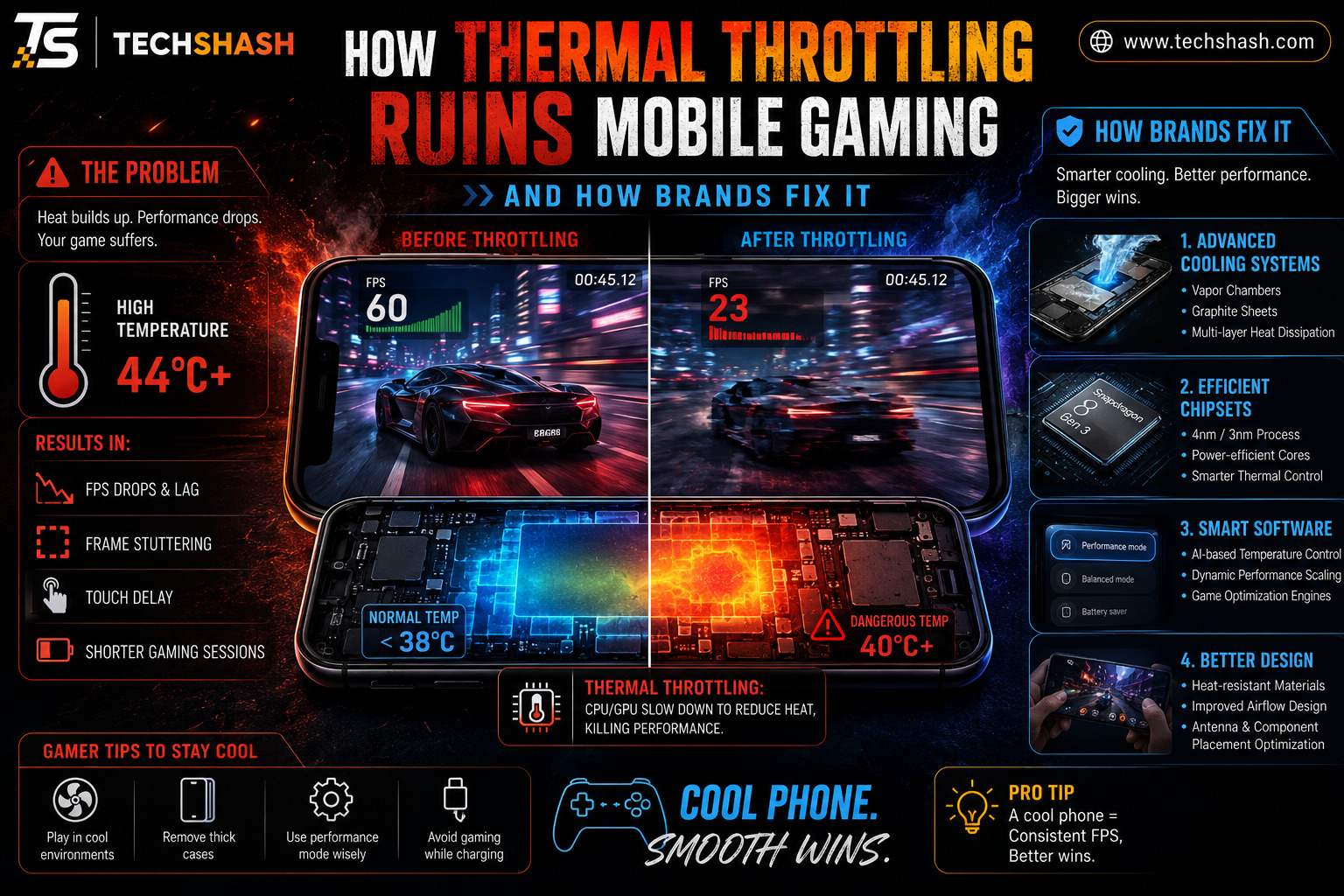
When thermal throttling activates, frame rates often drop from a smooth sixty frames per second down into the twenties. This sudden stuttering makes aiming, driving, and timing inputs nearly impossible. Unstable frame rates destroy competitive integrity and cause frustrating losses in multiplayer matches.
Input Latency and Touch Sampling
Overheated processors struggle to process touch inputs quickly. You might notice a frustrating delay between tapping the screen and seeing your character react. This added latency turns fast-paced shooter games into sluggish trials of patience.
Visual Degradation and Resolution Scaling
Many modern games feature automatic scaling systems that lower rendering resolutions when performance drops. Textures become blurry, shadows disappear, and distant objects turn into pixelated blobs. Your gorgeous smartphone screen suddenly displays visuals reminiscent of decade-old hardware.
4. Internal Hardware Solutions Used by Smartphone Makers
Engineers constantly invent clever ways to pull heat away from sensitive silicon components. Vapor chambers have become the industry standard for flagship gaming smartphones. A vapor chamber cooling system uses a sealed metal enclosure containing a tiny amount of liquid that vaporizes and condenses to cycle heat away.
Thermal Interface Materials
Between the processor and the cooling plate, manufacturers apply specialized pastes or graphite sheets. These materials fill microscopic air gaps to improve thermal conductivity. Better thermal transfer ensures heat moves rapidly toward the outer frame of the phone.
Strategic Component Placement
Placing the processor away from where users normally hold the phone reduces discomfort during long sessions. Some brands position the main chip directly in the center so heat disperses evenly across the back panel. Intelligent layout planning prevents single hot spots from burning your fingers.
5. External Cooling Accessories and Aftermarket Gear
Even the best internal cooling cannot dissipate infinite amounts of heat during marathon gaming sessions. Many mobile players now purchase external clip-on cooling fans. A magnetic semiconductor cooler uses Peltier elements to actively chill the back glass of the smartphone.
How Peltier Coolers Work
Semiconductor coolers create a temperature difference by drawing heat away from the phone surface and expelling it through an attached heatsink fan. These accessories can drop surface temperatures by twenty degrees Celsius in minutes. Active external cooling eliminates thermal throttling entirely during extended play sessions.
Ergonomic Trade-Offs
While external coolers restore peak performance, they add noticeable weight and bulk to the device. Players must also tether their phones to power banks or wall outlets to run these power-hungry fans. This setup sacrifices the primary benefit of mobile gaming, which is ultimate portability.
6. Software Optimizations and Adjustable Frame Rate Caps
Hardware modifications alone cannot solve every thermal issue without consuming excessive battery power. Software engineers design intelligent algorithms to manage processor workloads proactively. Game mode software utilities monitor thermal conditions in real time to balance performance and temperature output.
Frame Rate Limitation Strategies
Running a game at one hundred and twenty frames per second forces the processor to work twice as hard as running it at sixty frames per second. Locking the maximum frame rate to a stable sixty frames per second keeps temperatures well below the throttling threshold. This compromise delivers perfectly smooth gameplay without triggering sudden performance drops.
Background Task Management
Smartphones constantly run dozens of invisible background processes for notifications, cloud syncing, and location tracking. Dedicated gaming modes temporarily suspend these unnecessary background tasks to free up processing overhead. Reducing background clutter keeps the main processor focused entirely on rendering your game.
7. Choosing a Smartphone That Handles Sustained Loads
Not all mobile devices handle thermal stress with equal competence. Budget and mid-range phones often lack adequate heat pipes, leading to severe performance throttling within ten minutes of gaming. Sustained performance benchmarks provide a much truer picture of gaming capability than short raw speed tests.
What to Look for Before Buying
Research professional reviews that test phones under prolonged gaming loads rather than brief benchmark applications. Look for devices marketed specifically as gaming phones or flagship models featuring oversized vapor chambers. Checking user forums also reveals whether a specific model suffers from chronic overheating.
Case Materials and Thickness
Thick phones with metal frames dissipate heat much faster than ultra-thin glass or plastic models. Using a heavy-duty protective case while gaming acts as an insulator, trapping heat inside the device. Removing your phone case during intense gaming sessions helps maintain lower operating temperatures.
Key Takeaways Box
- Primary threat: Thermal throttling mobile gaming ruins competitive matches by causing sudden frame rate drops and input lag.
- Root cause: Compact enclosures lack active fans, forcing processors to slow down when internal temperatures exceed safe limits.
- Internal fixes: Manufacturers utilize advanced vapor chambers and thermal pastes to disperse heat away from silicon chips.
- External gear: Semiconductor cooling fans actively chill the exterior casing to maintain peak performance during marathon sessions.
- Software control: Limiting maximum frame rates prevents processors from working harder than necessary during gameplay.
FAQs
What is thermal throttling on a smartphone?
Thermal throttling is an automatic safety feature that slows down the processor when the device becomes too hot.
Do mobile gaming phones prevent overheating completely?
Gaming phones use massive vapor chambers and cooling fans to delay overheating, but they cannot defy physics during extreme workloads.
How can I stop my phone from lagging while gaming?
You can prevent lag by removing heavy protective cases, lowering graphic settings, and playing in cooler indoor environments.
Do external cooling fans actually work on phones?
External semiconductor coolers actively pull heat away from the back panel and successfully eliminate performance drops.
Does playing games while charging cause thermal throttling?
Charging generates significant battery heat that combines with processor heat, triggering thermal throttling much faster.
Conclusion
Thermal throttling remains the biggest obstacle facing mobile gamers who demand console-quality performance from pocket-sized hardware. Understanding how heat accumulates and how manufacturers combat it helps you make smarter purchasing and playing decisions. By prioritizing devices with proper cooling systems and managing your gaming sessions wisely, you can enjoy uninterrupted performance and victory in every match.