For years, video creators believed that high quality required a large mirrorless camera and heavy lenses. That belief is changing fast across YouTube, TikTok, and Instagram. Modern creators are packing away bulky camera bags and switching to lightweight smartphone rigs for video instead.
Many video makers discovered that carrying fifty pounds of gear slows down creative work. A smartphone combined with a metal frame, microphone, and compact light delivers excellent image quality without physical strain. This detailed guide covers why creators are switching to phone setups, how these setups work, and how you can build your own rig.
1. The High Cost and Heavy Weight of Traditional Camera Gear
Traditional cameras demand a large financial investment before you shoot a single frame of video. A standalone camera body often costs thousands of dollars, and high quality lenses cost just as much. Buying multiple prime lenses, zoom lenses, and extra optical glass quickly drains your budget.
Beyond the financial expense, physical weight creates a real barrier for independent creators. Lugging heavy camera backpacks, glass lenses, and thick tripods causes physical exhaustion during long shooting days. Carrying large gear bags through airports or busy city streets makes travel filming stressful.
Traditional Camera Setup Weight Profile:
– Camera Body: 1.5 – 2.5 lbs
– Lenses (2-3 items): 3.0 – 6.0 lbs
– Heavy Tripod & Fluid Head: 5.0 – 9.0 lbs
– Batteries & External Monitor: 2.0 – 4.0 lbs
Total Weight: Up to 21.5 lbs
Many creators experience creative burnout simply from setting up complex equipment. When putting together a camera takes fifteen minutes, spontaneous ideas fade away. Moving toward lightweight gear setups frees creators to focus on storytelling rather than managing heavy hardware.
Physical Strain on Travel Vloggers
Travel videographers suffer the most when using traditional gear setups. Walking through city streets with a heavy shoulder rig creates physical fatigue that ruins outdoor shoots.
Slow Setup Times Kill Spontaneity
Setting up traditional tripod plates, balancing heavy gimbals, and attaching external monitors takes precious time. Missing a fleeting sunset or a natural street interaction happens often when equipment assembly takes too long.
2. How Modern Phone Sensors and 4K Video Recording Changed Production
Smartphones inside modern pockets possess immense computing power and advanced optical sensors. Recent flagship phones capture 4K video recording at sixty frames per second with high color depth. Computational software inside smartphones adjusts exposure and dynamic range automatically in real time.
Phone manufacturers design custom image chips that process color data instantly. These processors balance bright skies and dark shadow areas far better than older camera systems. You get crisp clips right out of the device without spending hours adjusting color sliders on a computer.
- Computational HDR: Combines multiple exposures in milliseconds for balanced highlights and shadows.
- Log Video Profiles: Allows professional colorists to grade mobile footage in advanced editing software.
- Optical Image Stabilization: Keeps handheld video steady without requiring massive mechanical gimbals.
Resolution Comparison:
Standard HD: 1920 x 1080 pixels
4K Video: 3840 x 2160 pixels (4x sharper than HD)
Digital zoom used to ruin mobile video, but modern phones include multiple physical camera lenses. You can switch between ultra-wide, standard, and optical telephoto focal lengths with a single tap on your screen.
3. Building a Mobile Setup with a Smartphone Camera Cage and Accessories
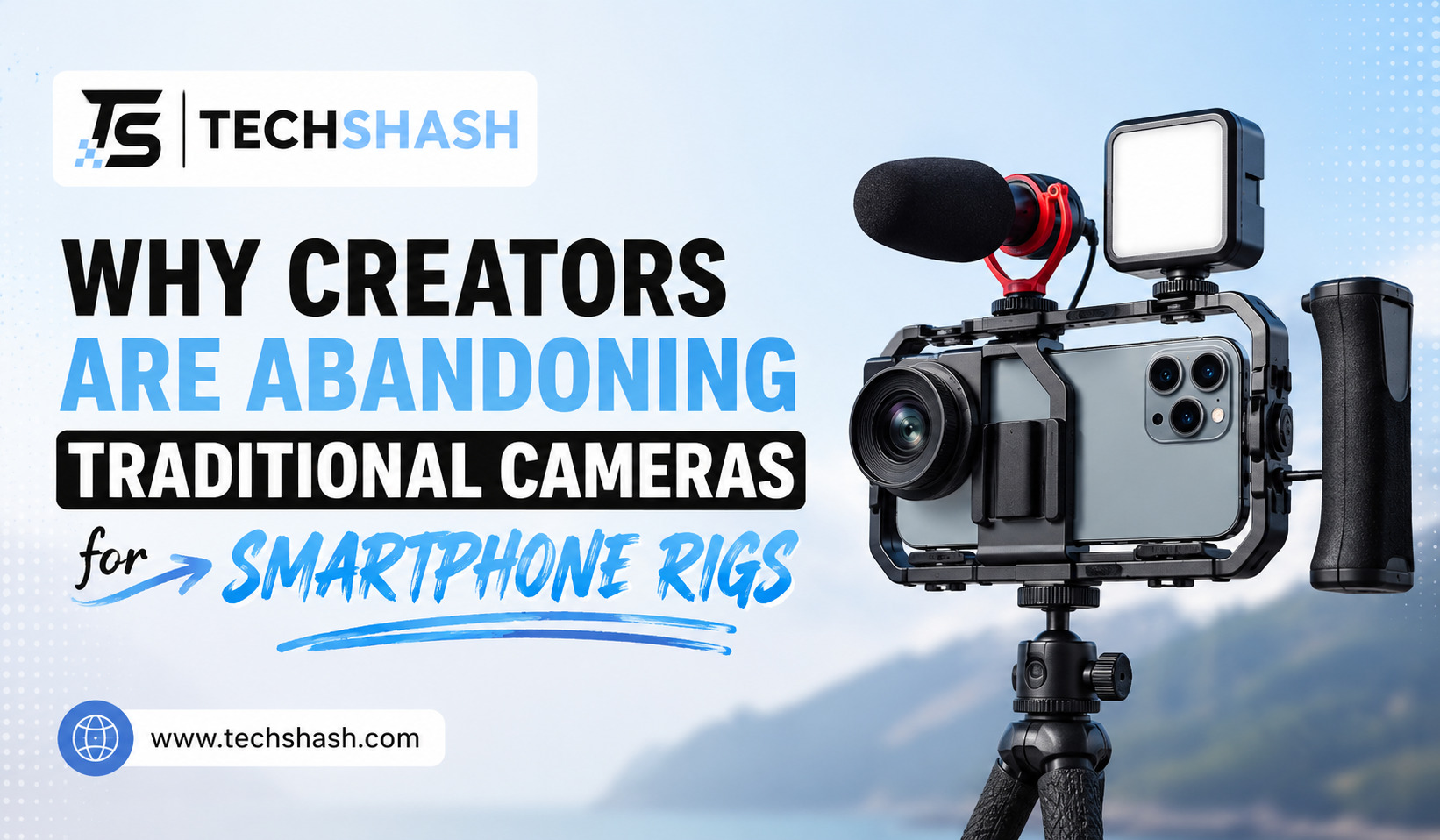
A bare phone is slippery and difficult to hold steady for cinematic shots. Creators solve this issue by placing their mobile phone into an aluminum smartphone camera cage that provides mounting points for extra tools.
[ Top Handle ]
|
[ Side Grip ] — [ Phone Cage ] — [ Cold Shoe Light ]
|
[ External Mic ]
These cages feature multiple quarter-inch screw threads and cold shoe slots around the perimeter. You can bolt on top handles, side grips, compact LED panels, and wireless microphone receivers easily.
Essential Accessories for Your Rig
- Ergonomic Side Handles: Give your hands double stability for smooth panning shots while walking.
- Compact LED Panels: Provide soft fill light on facial features during indoor or low light shoots.
- Power Banks: Mount directly to the cage backplate to keep your phone charged through full filming days.
- Wireless Microphones: Receivers plug straight into the USB charging port for instant audio capture.
Adding two side handles to a metal frame changes the physical weight distribution of your phone. The extra weight of the cage calms micro-jitters, producing smooth footage that rivals expensive mechanical gimbals.
4. The Unbeatable Speed of Mobile Content Creation and Direct Editing
Speed wins in the world of online video platforms. Creators who upload content quickly build stronger audiences than those delayed by long editing workflows. Utilizing mobile content creation workflows reduces the time between shooting a video clip and publishing it online.
When you film on a traditional digital camera, you must remove the memory card. Next, you insert that card into a computer reader, transfer giant video files, render proxies, and import clips into desktop editing software.
Traditional Workflow:
Shoot Video -> Remove SD Card -> Transfer to PC -> Render Proxies -> Edit -> Export -> Upload
(Time elapsed: Several hours)
Mobile Rig Workflow:
Shoot Video -> Open Mobile Editing App -> Cut & Polish -> Upload Directly
(Time elapsed: Minutes)
Mobile workflows eliminate those intermediate file transfer steps entirely. Your recorded video clips sit directly inside your device memory, ready for immediate editing. You can trim clips, apply color filters, add captions, and upload directly to YouTube or social platforms from the exact location where you filmed.
5. Why Smartphone Rigs for Video Provide Supreme Portability for Vlogging
Portability remains the primary reason content creators ditch traditional camera gear. Utilizing practical smartphone rigs for video allows creators to fit an entire production kit into a regular shoulder bag or small backpack.
Public filming also becomes much easier when you use compact equipment. Big camera setups attract unwanted attention, security guards, and curious crowds in city environments. A mobile rig looks casual, letting you shoot authentic street interviews without drawing suspicion or needing commercial permits.
| Feature | Traditional Camera Rig | Mobile Smartphone Rig |
| Total Kit Weight | 15 – 25 lbs | 2 – 4 lbs |
| Bag Space Needed | Large Backpack + Hard Case | Small Everyday Sling Bag |
| Public Profile | Highly Visible / Requires Permits | Low Profile / Discreeter |
| Battery Management | Multiple Custom Block Chargers | Single USB-C Power Bank |
Vloggers can shoot for five hours across town without suffering back pain. If you want to move to a new location, you simply grab your rig with one hand and walk away.
6. Overcoming Mobile Limitations with Lens Filters and External Audio
Smartphones have small sensors and fixed aperture lenses that create natural limitations. However, smart creators fix these minor issues using specialized rig attachments. The two biggest weaknesses of mobile video are harsh shutter speeds in bright sunlight and poor internal microphone quality.
To solve bright outdoor lighting issues, creators mount variable Neutral Density filters over their phone lenses. A Neutral Density filter acts like sunglasses for your camera, allowing you to shoot with a natural cinematic shutter speed even on bright sunny days.
Common Mobile Audio & Filter Accessories:
– Variable ND Filter (67mm Adapter): Eliminates harsh sunlight for smooth motion blur.
– Circular Polarizer (CPL): Removes glare from windows and water surfaces.
– Directional Shotgun Mic: Rejects background noise from behind the camera.
– Wireless Lavalier System: Captures crisp voice audio from twenty feet away.
Fixing audio quality is equally simple. Built-in phone microphones collect unwanted wind noise and room echoes from every direction. Attaching a small external microphone directly to your cage shoe mount captures clear human voices while rejecting background rumble.
7. Comparing the Total Costs of Mirrorless Cameras versus Phone Setups
Building a video production kit requires smart budget management. A mid-tier mirrorless camera body, fast zoom lens, microphone, gimbal, and heavy bag can cost upwards of four thousand dollars.
In contrast, almost every creator already owns a powerful smartphone. Spending a few hundred dollars on a cage, handles, micro-lights, and an external mic converts that existing phone into a high performing video rig.
Budget Comparison Breakdown:
Professional Mirrorless Setup:
– Camera Body: $1,800
– 24-70mm Lens: $1,200
– Wireless Audio Kit: $300
– Motorized Gimbal: $400
– Camera Bag & Accessories: $250
Total Cost: $3,950
Complete Mobile Rig Setup:
– Existing Smartphone: $0 (Already Owned)
– Aluminum Phone Cage: $45
– Dual Side Handles: $50
– Compact LED Light: $30
– Mobile Wireless Microphone: $150
– Variable ND Filter & Adapter: $65
Total Cost: $340
Saving thousands of dollars on equipment allows creators to invest their funds elsewhere. You can spend that money on travel, set design, lighting, or hiring help for your channel.
Key Takeaways
- Lower Equipment Weight: Mobile rigs reduce total gear weight from twenty pounds down to under four pounds.
- Faster Workflow Speed: Filming on a phone allows instant editing and direct publishing without computer file transfers.
- Discreet Public Filming: Compact phone cages let you shoot in public places without attracting security guards or crowds.
- Budget Savings: Upgrading a phone with cage accessories costs around three hundred dollars, saving thousands over mirrorless camera bodies.
- Improved Video Quality: Adding an external microphone and lens filters fixes the common optical limits of smartphones.
FAQs
Can a smartphone rig truly replace a professional cinema camera for commercial client work?
High-end commercial projects still require specialized cinema cameras for extreme low light performance and dynamic range, but smartphone setups work perfectly for social media content and online video channels.
Do I need a motorized gimbal if I use a metal phone cage with dual handles?
You do not strictly need a motorized gimbal because dual handles combined with built-in phone optical stabilization produce steady handheld footage for most scenes.
How do I prevent my phone battery from dying while filming long video shoots?
You can mount a compact USB-C power bank to the back of your phone cage using a simple clamp to keep your device charged continuously.
Will my phone overheat when recording long 4K video clips outdoors?
Lowering your screen brightness and keeping your phone out of direct sunlight between takes prevents internal heat build-up during long recording sessions.
Can I attach real camera filters to my mobile phone lens?
Yes, using a sixty-seven millimeter filter adapter clamp on your phone cage allows you to attach standard camera filters such as ND or polarizing filters easily.
Conclusion
The shift toward mobile video rigs represents a practical evolution in content creation. Creators no longer need to carry heavy backpacks filled with expensive lenses to produce engaging videos. By pairing your mobile phone with a cage, directional microphone, and neutral density filters, you unlock high production value with minimum hassle. Choosing smartphone rigs for video gives you the freedom to create content anywhere, anytime, without physical strain or slow technical delays.